










Function canceled
Function canceled


 Lyngsat
Kingofsat
Dishpointer
DVBSkystar.com
satbeams.com
CS Sat fórrum
Parabola
DVB-Upload
DVB N Forum
dvhk.pl
sat-television
Sat Centrum
SkyStar.org
TV Freak
Technisat
techneteuweb
Jak psat web
Jak na web
Zive.cz
Interval
O webu
Webguru
Builder.cz
Linuxsoft.cz
Tutorials.cz
web.net-mag.cz
Kosek.cz
webtvorba.cz
CSS Creator
samples.cz
programujte.com
builder.cz
časopis.programátor
učebnica c++
Odkiaľ je IP
Uč sa Anglicky
Speedtest
Otestujte sa
Lyngsat
Kingofsat
Dishpointer
DVBSkystar.com
satbeams.com
CS Sat fórrum
Parabola
DVB-Upload
DVB N Forum
dvhk.pl
sat-television
Sat Centrum
SkyStar.org
TV Freak
Technisat
techneteuweb
Jak psat web
Jak na web
Zive.cz
Interval
O webu
Webguru
Builder.cz
Linuxsoft.cz
Tutorials.cz
web.net-mag.cz
Kosek.cz
webtvorba.cz
CSS Creator
samples.cz
programujte.com
builder.cz
časopis.programátor
učebnica c++
Odkiaľ je IP
Uč sa Anglicky
Speedtest
Otestujte sa

V Plug Emulator
V Plug is a plugin that replaces the CAM module and access pay card — in other words, it is a
program that replaces the “hardware”. This means that with the SkyStar2 card you no longer need to
buy anything extra to make some encrypted channels work. This plugin must be copied into the plugins
directory (or into the root directory, e.g. ProgDVB, as stated in the readme).
V Plug does the same job as S2emu (it emulates the encryption system) and can handle these systems:
Seca1/2, Irdeto, Viaccess1/2 (there are several — 2.3, 2.4, 2.5), Nagra1/2, Cryptoworks, Conax, Biss,
and it also supports constant DCW.

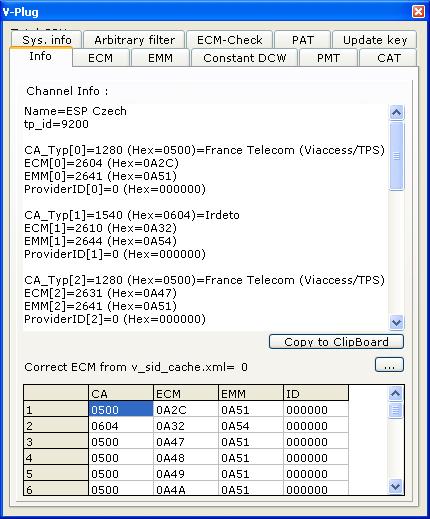
V Plug provides a much richer output for the user than S2emu. As you can see in the picture, there are up to 9 tabs: Info, ECM, EMM, Constant DCW, PMT, CAT, Sys Info, Arbitrary Filter, ECM Check, PAT, and Update key — so there is a lot there. Unfortunately, I am not an expert on emulators, but I will describe it from a simple user’s perspective — at least what I know. **Info** — this tab contains information about the currently tuned channel: program name, all encryption systems (if the program is broadcast in simulcrypt, even the names of the system creators are shown), and all necessary PIDs. **ECM** — this is a very important PID for decoding. It shows the specific ECM that ensures decryption (look closely at this tab, especially CW1+CW2 and the hash — you can see how nicely it changes). **Constant DCW** — this tab can be used when the provider has problems with the system (the program is encrypted, but the key does not change). In the fields DCW1+DCW2 you must enter the 32‑digit hex number, or write it directly into the file v_dcw.ini. The last tab I will mention is **Update key** — yes, it is used for online key updates (so an internet connection is required). Just double‑click at the bottom on “connect to internet and get keys”. V Plug will go through several key servers and when it finds the correct one, it writes the key into softcam.key and reloads the keys. These servers are listed in the file v_get_key.ini (if you don’t have this file, it will not work). And finally, a warning: This software is intended only for study purposes. It is forbidden to use it for illegal viewing of paid television.