










Function canceled
Function canceled


 Lyngsat
Kingofsat
Dishpointer
DVBSkystar.com
satbeams.com
CS Sat fórrum
Parabola
DVB-Upload
DVB N Forum
dvhk.pl
sat-television
Sat Centrum
SkyStar.org
TV Freak
Technisat
techneteuweb
Jak psat web
Jak na web
Zive.cz
Interval
O webu
Webguru
Builder.cz
Linuxsoft.cz
Tutorials.cz
web.net-mag.cz
Kosek.cz
webtvorba.cz
CSS Creator
samples.cz
programujte.com
builder.cz
časopis.programátor
učebnica c++
Odkiaľ je IP
Uč sa Anglicky
Speedtest
Otestujte sa
Lyngsat
Kingofsat
Dishpointer
DVBSkystar.com
satbeams.com
CS Sat fórrum
Parabola
DVB-Upload
DVB N Forum
dvhk.pl
sat-television
Sat Centrum
SkyStar.org
TV Freak
Technisat
techneteuweb
Jak psat web
Jak na web
Zive.cz
Interval
O webu
Webguru
Builder.cz
Linuxsoft.cz
Tutorials.cz
web.net-mag.cz
Kosek.cz
webtvorba.cz
CSS Creator
samples.cz
programujte.com
builder.cz
časopis.programátor
učebnica c++
Odkiaľ je IP
Uč sa Anglicky
Speedtest
Otestujte sa

Transponder Finder
Before reading this guide, I recommend reading the BlindScan guide first. It is

the same type of tool as BlindScan (meaning it is used to search for transponders on a satellite).
Unlike BlindScan, this scanner also works with SS2 cards revision 2.6 (BlindScan only works with revision 2.3).
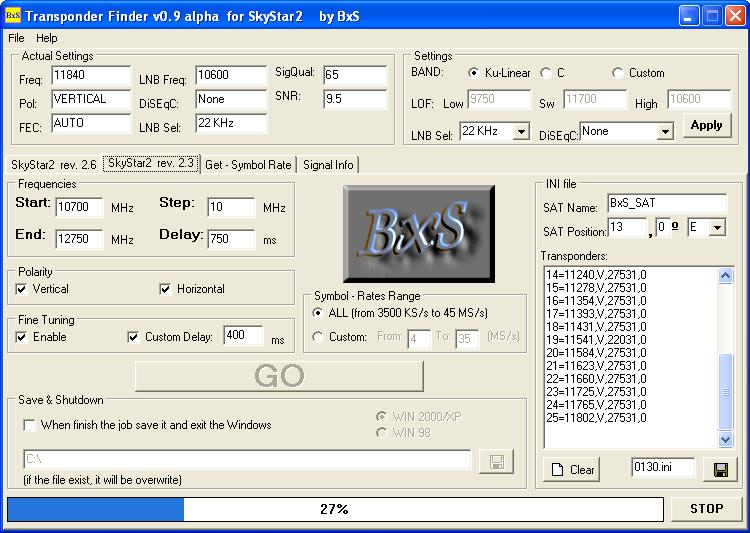
The application is installed normally. After launching Transponder Finder.exe, you will see the window (image).
In the top menu there is “Help”, where the entire program is described in English and Portuguese.
Since I do not have an SS2 rev. 2.6 card, I cannot test it, but there is a note stating that with rev. 2.6 it works only with driver 4.2.8 — here is a driver switcher.
The program contains 4 tabs: SkyStar rev 2.6, SkyStar rev 2.3, Get Symbol Rate, and Signal Info.
I prepared a simple description for the rev 2.3 tab — use the scanning values shown in the image and do not forget to select the satellite position on the left, press “GO”, and that’s it.
Then just save the results using the icon above the STOP button.
In my opinion, this program does not compare to BlindScan — scanning takes several times longer than BlindScan.
However, owners of SS2 rev. 2.6 have no other option (unless there is another scanner I am not aware of).
That is probably everything about Transponder Finder.
I wish you pleasant scanning.
download: tpfinder09a.zip