










Function canceled
Function canceled



 Lyngsat
Kingofsat
Dishpointer
DVBSkystar.com
satbeams.com
CS Sat fórrum
Parabola
DVB-Upload
DVB N Forum
dvhk.pl
sat-television
Sat Centrum
SkyStar.org
TV Freak
Technisat
techneteuweb
Jak psat web
Jak na web
Zive.cz
Interval
O webu
Webguru
Builder.cz
Linuxsoft.cz
Tutorials.cz
web.net-mag.cz
Kosek.cz
webtvorba.cz
CSS Creator
samples.cz
programujte.com
builder.cz
časopis.programátor
učebnica c++
Odkiaľ je IP
Uč sa Anglicky
Speedtest
Otestujte sa
Lyngsat
Kingofsat
Dishpointer
DVBSkystar.com
satbeams.com
CS Sat fórrum
Parabola
DVB-Upload
DVB N Forum
dvhk.pl
sat-television
Sat Centrum
SkyStar.org
TV Freak
Technisat
techneteuweb
Jak psat web
Jak na web
Zive.cz
Interval
O webu
Webguru
Builder.cz
Linuxsoft.cz
Tutorials.cz
web.net-mag.cz
Kosek.cz
webtvorba.cz
CSS Creator
samples.cz
programujte.com
builder.cz
časopis.programátor
učebnica c++
Odkiaľ je IP
Uč sa Anglicky
Speedtest
Otestujte sa

Off-line Decoders
What exactly is an off-line Descrambler and off-line Decoder? Anyone interested in DVB has surely encountered a situation where they wanted
to record something, but the program was encrypted at that moment and the key was not known, or they did not have the original decoding card.
How to do it: First, using a DVB Player, record the transport stream to the HDD — i.e., the complete data transmitted by the transponder.
You must have the correct ECM checked, and also the video PID, audio PID (sometimes there are more, if the film can be watched in multiple
language versions), subtitles, teletext — simply record everything that is being transmitted.
The most well‑known players can record TS (DVBDream, ALTDVB, SkyView, ProgDVB, myTheatre). The recorded file has the extension *.ts* and is
usually slightly larger than a pure MPEG2 file. So now we have a recorded stream with the *.ts* extension.
Start the program OfflineDecoder — it will also open the MD Api Wrapper window (first copy the correct plugins into the MD Plugins directory,
whether s2emu (softcam), WinCSC, or some CAM plugin, depending on what you want to decode). There you will see the copied plugins.
In the right column of the program there is the CSA Engine option — you must select one of the devices: FFDecsa.dll or CSA.Optimized.dll.
These files must be located in the root directory of the program; if they are not there, find them online using the link provided below.
Next, click browse and select the input TS file you recorded.
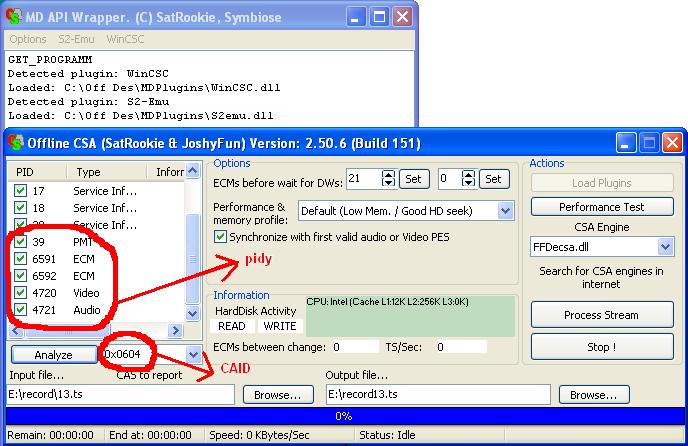
Then click analyze — in the left window you will see all PIDs; the important ones are the last four (ECM, PMT, Video and Audio).
Once done, next to the analyze button is the CAID field — some values are pre‑set, but some may be missing, so find the correct ident
and enter it as a HEX number. Finally, click the right browse button and set the path for the output file.
That’s basically everything — now just click the process stream button. The processing time depends on the file size; I tested a ~50 MB file
and it took about 10 seconds. When decoding is finished, a message appears: “Descrambled finished”.
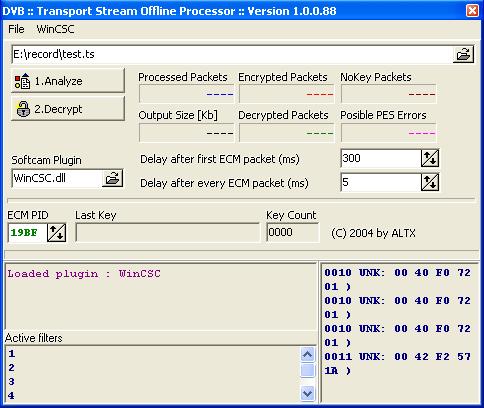
TS OfflineDecoder by ALTX (image 2) should work similarly.
The descrambled TS can now be converted to MPEG2 using ProjectX or PVAStrumento and further processed.
download OfflineDescrambler