






Switch to Slovak version


IP adresa: 216.73.216.139
visited 142670 times
processing time 0.001 s.
Wed 22. jul 2026 - 16:02:53
browsing this site: 1
Today celebration: Magdaléna
Tomorrow: O¾ga
My favourite Player?
DVBDream 16.7%

SkyView 16.7%
AltDVB 50.0%
ProgDVB 0.0%
myTheatre 0.0%
Anoth 16.7%
total votes: 12
My favorite Emu
S2emu 21.1%total votes: 19


Function canceled
Function canceled



 Lyngsat
Kingofsat
Dishpointer
DVBSkystar.com
satbeams.com
CS Sat fórrum
Parabola
DVB-Upload
DVB N Forum
dvhk.pl
sat-television
Sat Centrum
SkyStar.org
TV Freak
Technisat
techneteuweb
Jak psat web
Jak na web
Zive.cz
Interval
O webu
Webguru
Builder.cz
Linuxsoft.cz
Tutorials.cz
web.net-mag.cz
Kosek.cz
webtvorba.cz
CSS Creator
samples.cz
programujte.com
builder.cz
časopis.programátor
učebnica c++
Odkiaľ je IP
Uč sa Anglicky
Speedtest
Otestujte sa
Lyngsat
Kingofsat
Dishpointer
DVBSkystar.com
satbeams.com
CS Sat fórrum
Parabola
DVB-Upload
DVB N Forum
dvhk.pl
sat-television
Sat Centrum
SkyStar.org
TV Freak
Technisat
techneteuweb
Jak psat web
Jak na web
Zive.cz
Interval
O webu
Webguru
Builder.cz
Linuxsoft.cz
Tutorials.cz
web.net-mag.cz
Kosek.cz
webtvorba.cz
CSS Creator
samples.cz
programujte.com
builder.cz
časopis.programátor
učebnica c++
Odkiaľ je IP
Uč sa Anglicky
Speedtest
Otestujte sa

Microcom ADSL DeskPorte USB
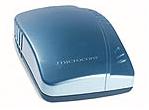
This ADSL USB modem allows connection to high‑speed Internet using ADSL technology (Asymmetric Digital Subscriber Line). I am connected at 1024 KB, so the download speed is about 120–130 kb/s. When I imagine that less than half a year ago I was downloading at 4–5 kb/s, it makes me feel a bit sick.

Dimensions: 130 x 107 x 27 mm
Features:
• Switchable Annex A and Annex B
• External power supply not required
• Plug & Play for Windows 98/2000/ME/XP
• Ethernet over ATM, IP over ATM, PPP over ATM and PPP over Ethernet
• Support for audio and video streaming
• Simple and intuitive graphical interface
• Software upgrade capability
Technical Specifications
• Conexant chipset
• Full‑rate ADSL ANSI T1.413 Issue 2, G.DMT
• Downstream: Up to 8 Mbps at 32 Kbps
• Upstream: Up to 1 Mbps at 32 Kbps G.LITE
• USB 1.1 Host Powered – powered through USB interface
Supported Protocols
• RFC 1483 (Ethernet over ATM)
• RFC 2364 (PPP over ATM)
• RFC 1577 (IP over ATM)
• RFC 2516 (PPP over Ethernet)
• ITU‑T G.992.1
• ITU‑T G.992.2
• ITU‑T G.994.1
Supported OS
• Windows 98SE/ME
• Windows 2000/XP
Software Interface
• MS NDIS 4.0 WAN miniport
• NDIS 4.0 LAN miniport
• NDIS 5.0 ATM miniport for RAS and Dial‑up Networking
Connection
• ADSL interface: Standard telephone RJ‑11
• USB interface: Standard USB cable
Specifications taken from the official Microcom website.
This article was prepared by jany: Last update 20.03.2006
Site is optimized for Internet Explorer, Firefox, Mozilla and Opera (others are not tested)
resolution 1024x768 © 2005-2026 ::: admin jany :::