










Function canceled
Function canceled


 Lyngsat
Kingofsat
Dishpointer
DVBSkystar.com
satbeams.com
CS Sat fórrum
Parabola
DVB-Upload
DVB N Forum
dvhk.pl
sat-television
Sat Centrum
SkyStar.org
TV Freak
Technisat
techneteuweb
Jak psat web
Jak na web
Zive.cz
Interval
O webu
Webguru
Builder.cz
Linuxsoft.cz
Tutorials.cz
web.net-mag.cz
Kosek.cz
webtvorba.cz
CSS Creator
samples.cz
programujte.com
builder.cz
časopis.programátor
učebnica c++
Odkiaľ je IP
Uč sa Anglicky
Speedtest
Otestujte sa
Lyngsat
Kingofsat
Dishpointer
DVBSkystar.com
satbeams.com
CS Sat fórrum
Parabola
DVB-Upload
DVB N Forum
dvhk.pl
sat-television
Sat Centrum
SkyStar.org
TV Freak
Technisat
techneteuweb
Jak psat web
Jak na web
Zive.cz
Interval
O webu
Webguru
Builder.cz
Linuxsoft.cz
Tutorials.cz
web.net-mag.cz
Kosek.cz
webtvorba.cz
CSS Creator
samples.cz
programujte.com
builder.cz
časopis.programátor
učebnica c++
Odkiaľ je IP
Uč sa Anglicky
Speedtest
Otestujte sa

Basic Info About Sky Star 2
The DVB Sky Star 2 card is designed for receiving digital TV, radio, and data. Currently,
there are two versions of this card available on the market:
• Sky Star 2 rev. 2.3
• Sky Star 2 rev. 2.6
The image shows rev. 2.3 — this is the card I also have in my PC. It differs slightly from rev. 2.6,
but essentially it is the same. For example, the software BlindScan
works only with rev. 2.3.

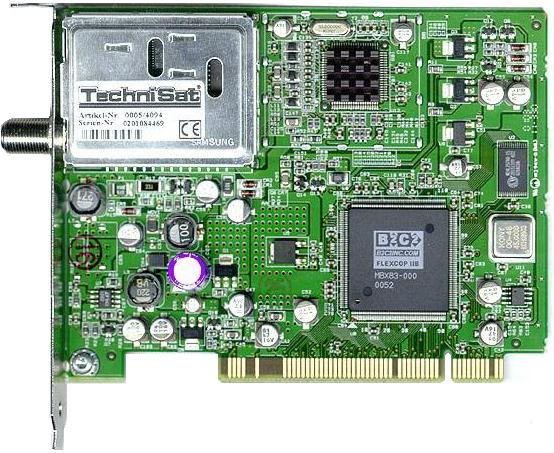
The card is equipped with a B2C2 chip. It has no inputs or outputs, only a single connector for connecting the coaxial cable from the LNB. It supports all players listed in the left menu. What might interest a beginner is that it can: record video and audio to the HDD in the format offered by the player (usually MPEG2 or TS). It is possible to browse teletext and EPG (electronic program guide), but only on channels that broadcast them. Using special plugins, some PAY cards can be emulated. SS2 can also process HDTV, but only in DVB‑S (not DVB‑S2). And of course, the card can also be used for satellite internet, whether paid or free. Installation requirements: Windows 98/ME/XP/2000 — I recommend at least XP, because most DVB players run under XP. Also minimum DirectX 9.0 and Windows Media Player 9. SS2 also works under Linux, but you need a kernel that includes a driver for SS2.