










Function canceled
Function canceled


 Lyngsat
Kingofsat
Dishpointer
DVBSkystar.com
satbeams.com
CS Sat fórrum
Parabola
DVB-Upload
DVB N Forum
dvhk.pl
sat-television
Sat Centrum
SkyStar.org
TV Freak
Technisat
techneteuweb
Jak psat web
Jak na web
Zive.cz
Interval
O webu
Webguru
Builder.cz
Linuxsoft.cz
Tutorials.cz
web.net-mag.cz
Kosek.cz
webtvorba.cz
CSS Creator
samples.cz
programujte.com
builder.cz
časopis.programátor
učebnica c++
Odkiaľ je IP
Uč sa Anglicky
Speedtest
Otestujte sa
Lyngsat
Kingofsat
Dishpointer
DVBSkystar.com
satbeams.com
CS Sat fórrum
Parabola
DVB-Upload
DVB N Forum
dvhk.pl
sat-television
Sat Centrum
SkyStar.org
TV Freak
Technisat
techneteuweb
Jak psat web
Jak na web
Zive.cz
Interval
O webu
Webguru
Builder.cz
Linuxsoft.cz
Tutorials.cz
web.net-mag.cz
Kosek.cz
webtvorba.cz
CSS Creator
samples.cz
programujte.com
builder.cz
časopis.programátor
učebnica c++
Odkiaľ je IP
Uč sa Anglicky
Speedtest
Otestujte sa

BlindScan
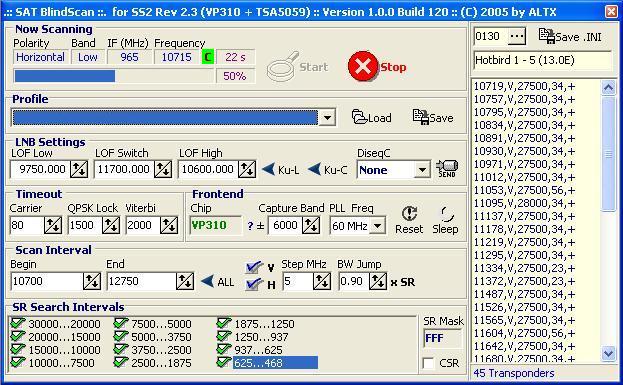
BlindScan is a very handy little program from ALTX, who is also responsible for AltDVB, OffDecoder, and WinCSC (all of his programs belong among the top tools in the DVB field, not only for SS2). From the name of the program we can already guess that it is a kind of transponder scanner. In the readme, ALTX writes that this program works only with cards that have revision 2.3 (I have not tested other revisions such as 2.6, so I cannot confirm, but it is likely true). Extract the program somewhere on your disk (I usually extract everything to c:/) and open the file BlindScan.exe. The window you see is divided into 7 parts. At the very top is “Now Scanning”, with stop and start buttons — this section also informs you about newly found transponders. The next section is Profile, used for saving and loading profiles into the program; the zip file already contains two preset profiles. The next section is LNB Settings, where you simply set the band and DiseqC. The next section is timeout and frontend — we probably won’t touch that. Then comes the scan interval section — leave the frequency set from 10700–12750, both H and V as they are, and I set the step to 5 MHz, though 10 MHz is probably enough. In the bottom section, SR search intervals, check all SR values. And the last section is on the right — there you select the satellite you want to scan (click the three dots). Now you can finally press start. Scanning takes only a few seconds. All transponders that were scanned can be saved into an INI file (the save INI button is at the top right), giving you the most up‑to‑date transponder list. It is also important to note that BlindScan works correctly with driver version 4.3.0 and older versions. That’s probably everything about this program.